

Control Flow in JavaScript: If, Else, and Switch Explained
A beginner-friendly guide to how JavaScript makes decisions using if, else if, else, and switch

Introduction
Programming sirf data store karne ya calculations karne tak limited nahi hoti.
Program ko decisions bhi lene padte hain.
For example:
agar age 18 se zyada hai toh adult bolo
agar marks zyada hain toh pass bolo
agar Monday hai toh specific message dikhao
Yahin se control flow ka concept start hota hai.
Simple words mein:
control flow ka matlab hai code kis condition par kis direction mein chalega
What Control Flow Means in Programming
Normally JavaScript line by line chalta hai.
Lekin har line har situation mein run nahi hoti.
Kabhi-kabhi condition ke basis par code:
alag branch choose karta hai
kuch lines skip karta hai
ya alag result deta hai
Yahi decision-making behavior control flow ke through aata hai.
The if Statement
if tab use hota hai jab code ka koi part sirf specific condition true hone par chalna chahiye.
Example:
let age = 20;

if (age >= 18) {
  console.log("You are an adult");
}
Agar condition true hai, block chalega.
False hai toh skip ho jayega.
The if-else Statement
Jab do possible paths hon, tab if-else use hota hai.
Example:
let age = 16;

if (age >= 18) {
  console.log("Adult");
} else {
  console.log("Minor");
}
Yahan program do options mein se ek choose karega.
The else if Ladder
Jab multiple conditions check karni hon, tab else if ladder useful hota hai.
Example:
let marks = 82;

if (marks >= 90) {
  console.log("Grade A");
} else if (marks >= 75) {
  console.log("Grade B");
} else if (marks >= 50) {
  console.log("Grade C");
} else {
  console.log("Need improvement");
}
Code top se neeche conditions check karta hai.
Jo pehli true milti hai, us branch ka code run hota hai.
Real-Life Decision Analogy
Control flow ko everyday life se samjho:
If it is raining -> umbrella le lo
Else -> normal bahar jao
Ya:
If marks above 90 -> excellent
Else if marks above 75 -> good
Else -> more practice
Is tarah ka thinking programming mein directly use hota hai.
The switch Statement
Jab ek hi value ke multiple exact cases compare karne hon, tab switch readable option hota hai.
Example:
let day = "Monday";

switch (day) {
  case "Monday":
    console.log("Start of the week");
    break;
  case "Friday":
    console.log("Almost weekend");
    break;
  case "Sunday":
    console.log("Holiday");
    break;
  default:
    console.log("Normal day");
}
Yahan switch ek value ko different cases ke against compare kar raha hai.
Why break Is Important in switch
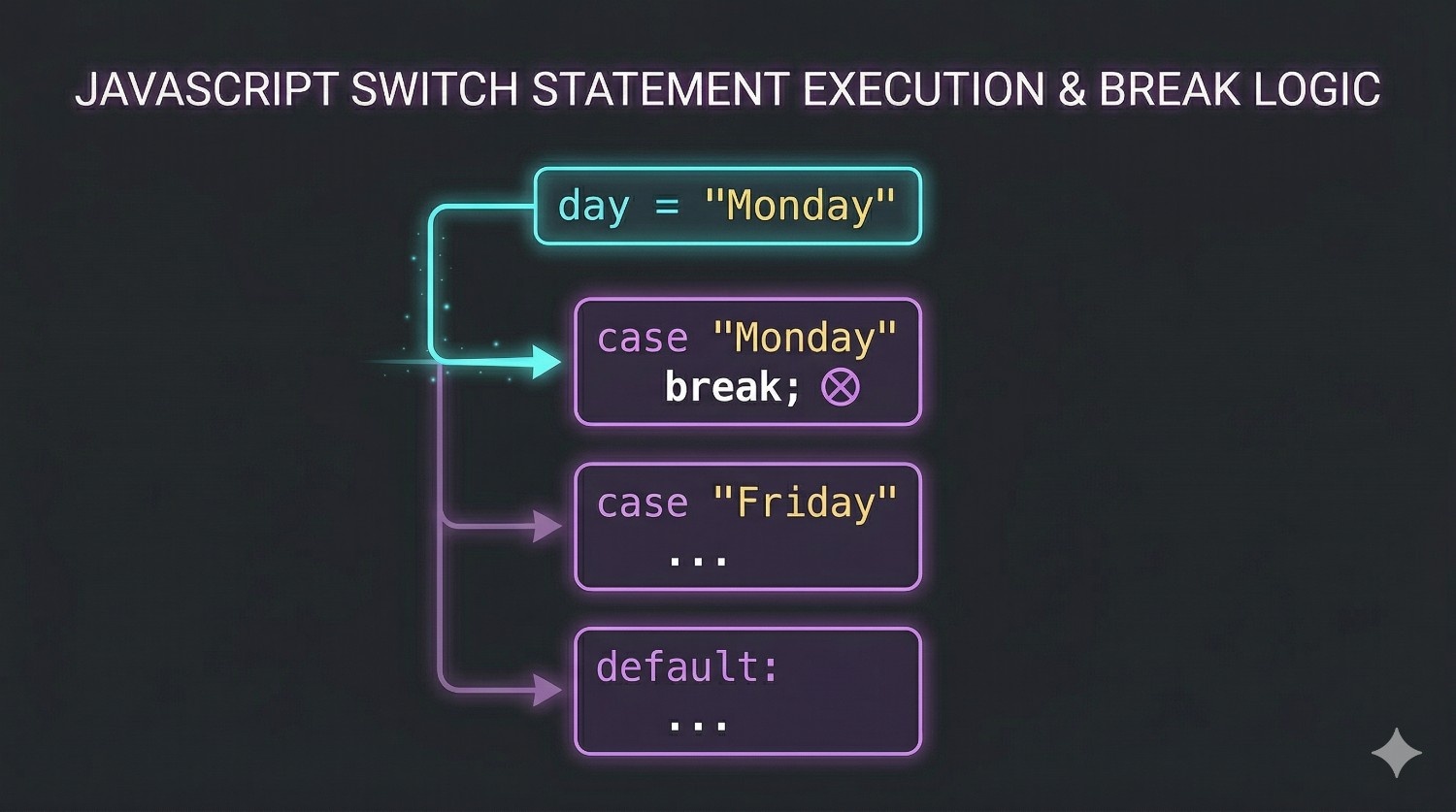
break switch ke andar bahut important hota hai.
Agar break na ho, toh code next case mein bhi gir sakta hai.
Simple words mein:
break bolta hai: case match ho gaya, ab yahin ruk jao
Ye beginners ko clearly samajhna chahiye.
When to Use switch vs if-else
if-else kab useful hota hai?
ranges check karni ho
logical conditions hon
multiple different expressions compare karni hon
Example:
age check
marks check
positive/negative/zero check
switch kab useful hota hai?
same variable ke exact values compare karni hon
multiple fixed options hon
Example:
day of week
menu choice
role value
Simple rule:
conditions flexible hain ->
if-elseexact cases hain ->
switch
Step-by-Step Example
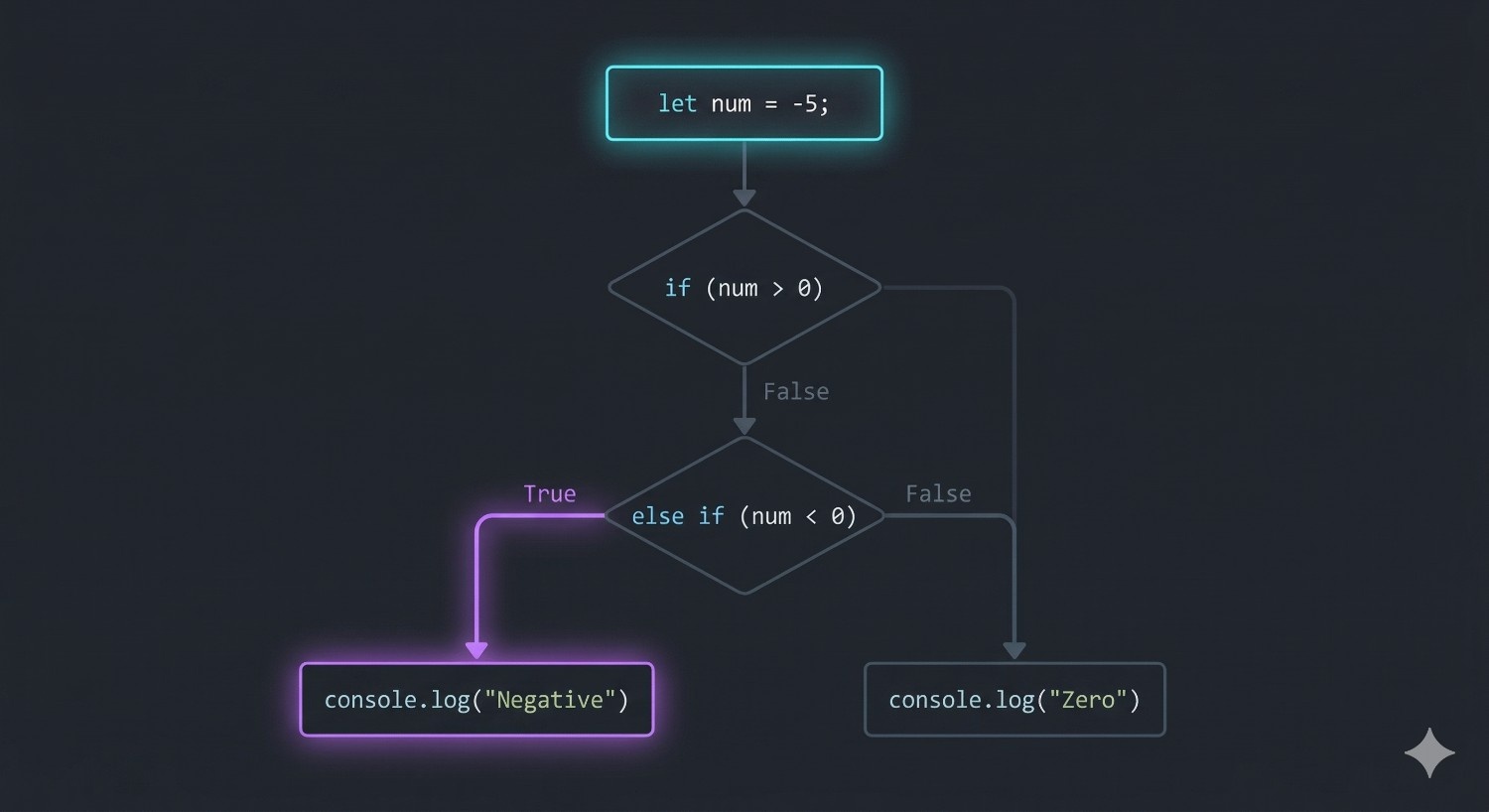
Positive, negative, or zero:
let num = -5;

if (num > 0) {
  console.log("Positive");
} else if (num < 0) {
  console.log("Negative");
} else {
  console.log("Zero");
}
Yahan if-else isliye use hua kyunki exact case names nahi, conditions compare ho rahi hain.
Day of week:
let day = "Tuesday";

switch (day) {
  case "Monday":
    console.log("Start");
    break;
  case "Tuesday":
    console.log("Keep going");
    break;
  default:
    console.log("Another day");
}
Yahan switch isliye useful hai kyunki ek single value ko exact named cases ke saath compare kar rahe hain.
A Small Practice Assignment
Try these:
Check whether a number is positive, negative, or zero
Print the day of the week using
switch
Phir khud explain karo:
first case mein
if-elsekyun use kiyasecond case mein
switchkyun use kiya
Ye exercise understanding ko strong karti hai.
Summary
control flow ka matlab hai program kis path par chalega
ifek condition check karta haiif-elsedo paths mein se ek choose karta haielse ifmultiple conditions handle karta haiswitchexact case-based matching ke liye useful hota haibreakswitch ke andar important hota hai
Final Thought
Control flow programming ka real decision-making part hai.
Ek baar if, else if, else, aur switch clearly samajh aa gaye, toh code ka logic zyada natural lagne lagta hai.


